Dynamics 365 Speech Analytics & Call Quality Control Add-on
Transform Every Customer Conversation into Actionable Insight
In today's competitive market, every phone call matters. Sales and support conversations are a goldmine of intelligence — but most organizations lack the tools to systematically capture, transcribe, and evaluate them. The Dynamics 365 Speech Analytics and Phone Calls Quality Control Add-on by dynamics-partner.com bridges this gap by bringing AI-powered call evaluation directly into your Microsoft Dynamics 365 environment.
Now available on Microsoft AppSource — fully validated and ready to deploy in your Dynamics 365 tenant.
What Is the Speech Analytics & Quality Control Add-on?
This add-on is a native Microsoft Dynamics 365 extension that automatically analyzes recorded phone conversations, transcribes them using speech-to-text technology, and scores each call against customizable quality criteria. It combines the power of Azure AI Speech services with the flexibility of the Dynamics 365 platform to deliver objective, repeatable, and scalable call quality control.
Instead of manually listening to dozens of calls per agent, supervisors get an instant AI-generated summary and score for every conversation — saving hundreds of hours of QA work each month.
Build Your Own Quality Framework with Custom Checklists
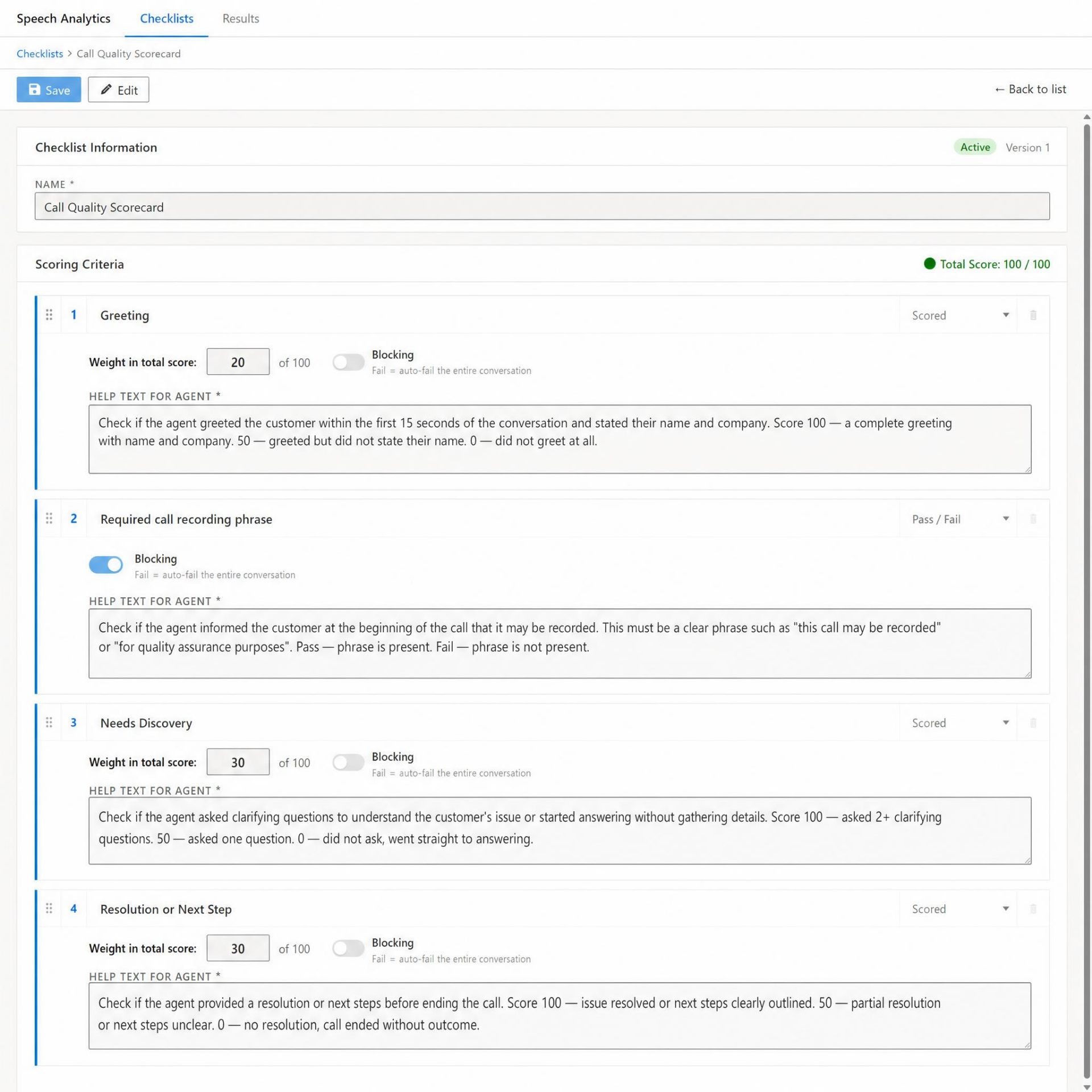
The heart of the add-on is the Checklist Builder, where you define exactly how every call should be evaluated. Each checklist is versioned and can be activated or archived, giving your QA team full control over scoring standards as they evolve.
The Checklist Builder lets you create a fully weighted Call Quality Scorecard with a real-time Total Score validator (100/100).
How the Checklist Builder Works
- Named, versioned checklists — e.g., "Call Quality Scorecard", marked Active / Version 1 for full audit traceability.
- Real-time score validation — the Total Score: 100/100 indicator ensures all criteria weights add up correctly before saving.
- Three criterion types per item:
- Scored — graded on a 0–100 scale with a custom weight (e.g., Greeting = 20, Needs Discovery = 30, Resolution or Next Step = 30).
- Pass / Fail — binary compliance checks (e.g., Required call recording phrase).
- Blocking — when enabled, a failure here auto-fails the entire conversation, regardless of other scores.
- "Help Text for Agent" — each criterion includes detailed scoring guidance, ensuring consistent, transparent evaluation.
- Drag-and-drop ordering — reorganize criteria instantly to match your call flow.
This level of configurability lets you align evaluation with industry best practices, such as those outlined in Microsoft's Dynamics 365 Customer Service documentation.
Centralized Results Dashboard
Once calls are processed, the Results tab becomes your command center for quality monitoring across the entire team.
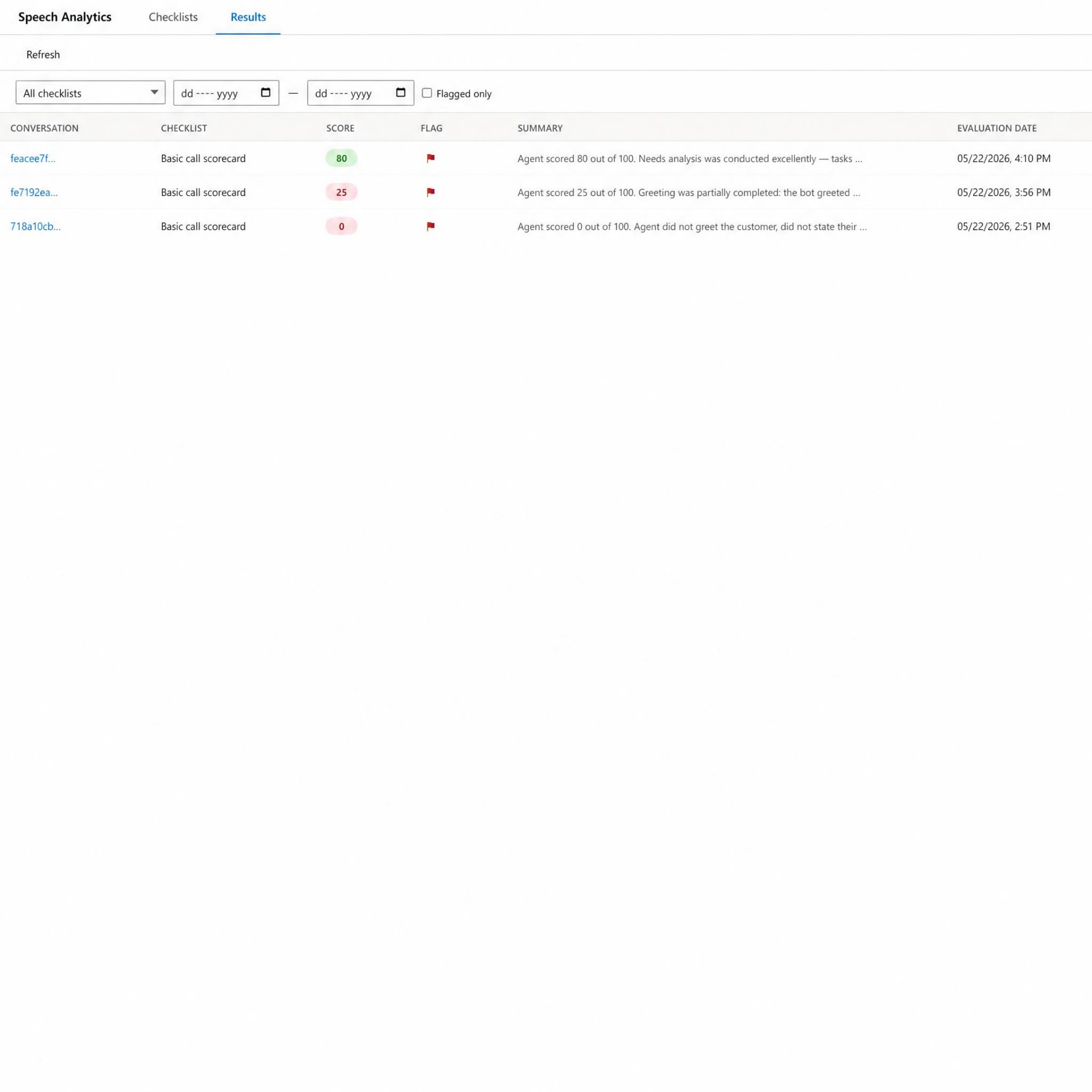
The Results dashboard displays every evaluated conversation with its score, compliance flag, AI summary, and evaluation date.
Results Dashboard Features
- At-a-glance scoring — color-coded scores (green for high, red for low) make outliers instantly visible.
- Compliance flags — a red flag highlights conversations with critical (blocking) violations.
- Powerful filtering — filter by checklist, date range, or show flagged-only results.
- AI summary preview — each row shows a one-line AI explanation of the score.
- Direct drill-down — click any conversation ID to open the full evaluation.
Detailed Per-Call Evaluation
Every conversation record includes a dedicated Speech Analytics tab inside the standard Dynamics 365 conversation form, so QA lives exactly where your agents and managers already work.
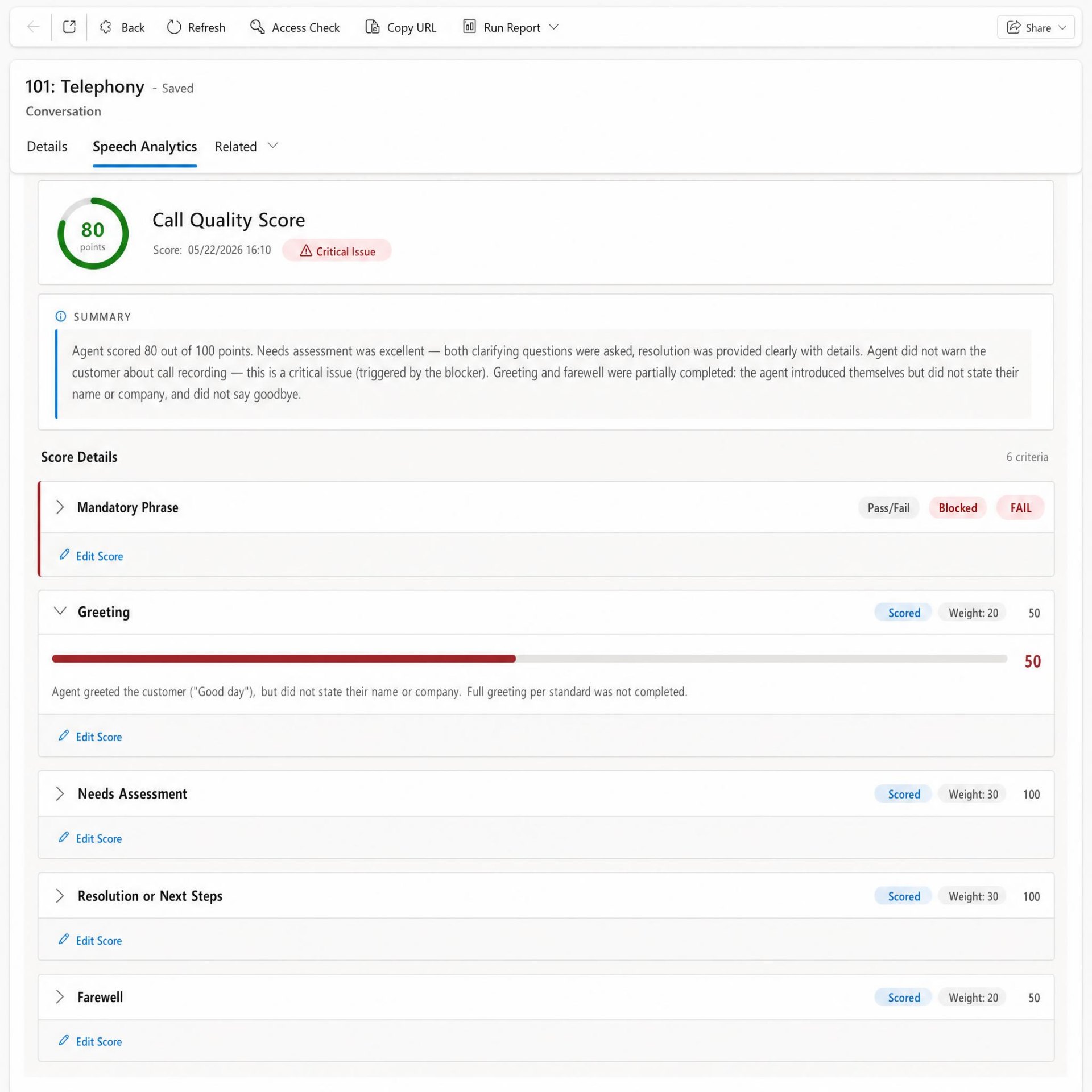
The Speech Analytics tab on a conversation record shows the overall Call Quality Score, a Critical Issue alert, the AI summary, and a breakdown of all scoring criteria.
What You See on Each Conversation
- Visual score gauge — an instant 80-point ring with date and time of evaluation.
- Critical Issue alert — a clear red warning when a blocking criterion has failed.
- AI Summary — a natural-language explanation of why the call earned its score.
- Score Details — every criterion expanded with its type, weight, points, and a written justification.
- Edit Score — supervisors can manually override the AI's evaluation, keeping a human in the loop.
In-Depth Evaluation Details Popup
For deep-dive QA reviews, the Evaluation Details view presents a complete, audit-ready breakdown of the call.
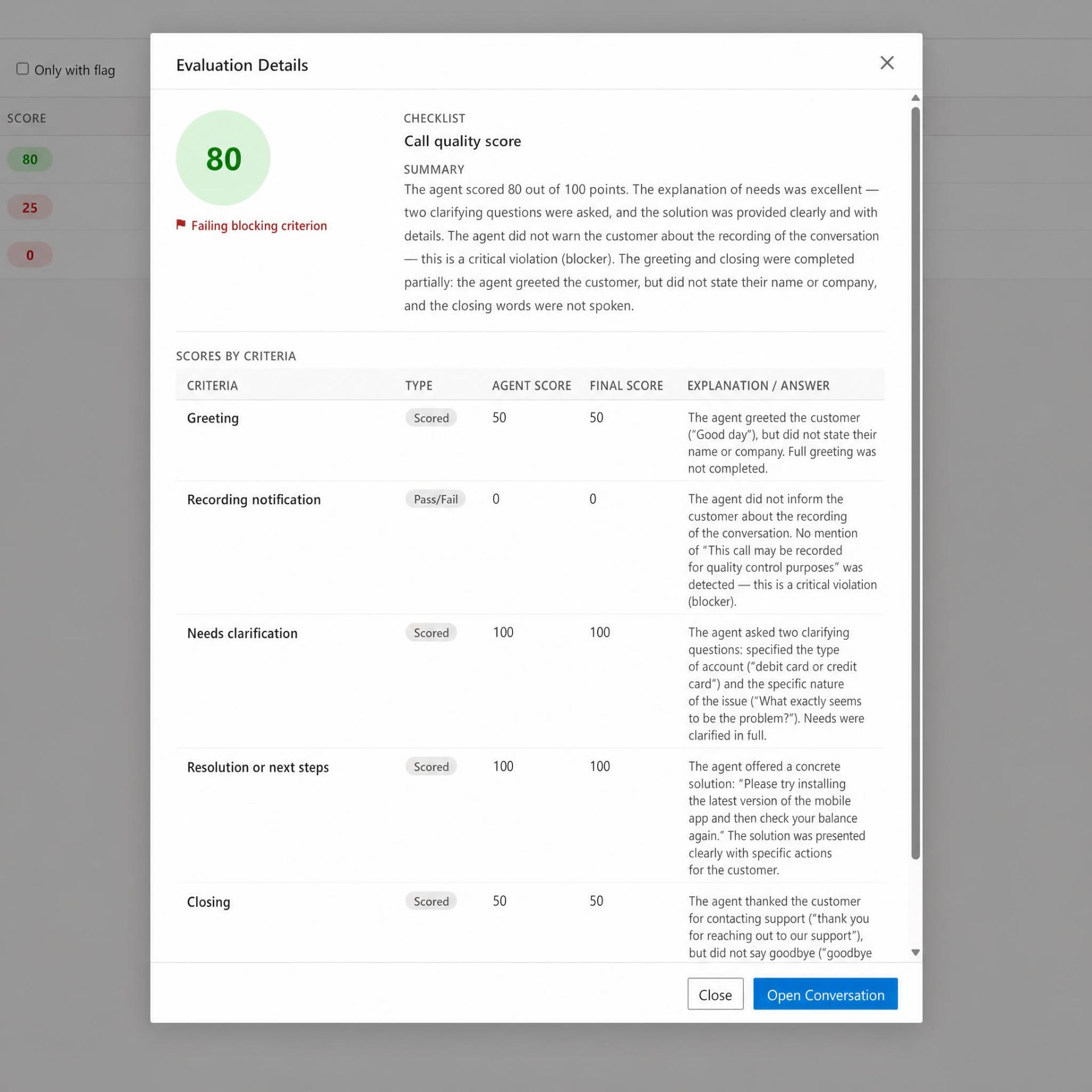
The Evaluation Details popup provides a full per-criterion table — including Agent Score, Final Score, and detailed AI explanations.
Evaluation Details at a Glance
- Scores by Criteria table — side-by-side Agent Score vs. Final Score for full transparency.
- Granular AI explanations — the AI quotes exact phrases from the call for each criterion.
- Blocking criterion alert — a clear flag explains compliance failures.
- One-click navigation — jump straight to the full conversation with Open Conversation.
Key Benefits
| Benefit | Impact |
|---|---|
| 100% call coverage | Evaluate every call, not just a 2% manual sample |
| Objective scoring | Eliminate subjective bias in agent reviews |
| Faster onboarding | New agents learn from data-driven feedback |
| Compliance assurance | Automatic detection of mandatory disclosures (blockers) |
| Native integration | No third-party silos — everything inside Dynamics 365 |
| Human-in-the-loop | Supervisors can override AI scores anytime |
Seamless Integration with the Microsoft Ecosystem
- Dynamics 365 Sales and Customer Service
- Azure AI Speech for high-accuracy transcription
- Power BI for advanced QA reporting and dashboards
- Existing telephony providers via the Dynamics 365 Channel Integration Framework
Available Now on Microsoft AppSource
The Dynamics 365 Speech Analytics and Phone Calls Quality Control Add-on is officially published on Microsoft AppSource, Microsoft's trusted marketplace for business applications. This means the solution has met Microsoft's technical and security validation standards and can be deployed directly into your environment with confidence.
Get Started Today
Ready to turn your phone conversations into a strategic advantage? Discover how the Speech Analytics and Quality Control Add-on can elevate your contact center performance.
📩 Contact us: Dmitry.Loboda@dynamics-partner.com
🌐 Website: dynamics-partner.com
Request a personalized demo and see your own calls scored automatically inside Dynamics 365.
Frequently Asked Questions
Is the add-on available on Microsoft AppSource?
Yes. The Dynamics 365 Speech Analytics and Phone Calls Quality Control Add-on is published and validated on Microsoft AppSource.
Can I build my own scoring criteria?
Absolutely. The Checklist Builder supports fully weighted Scored, Pass/Fail, and Blocking criteria with custom agent help text and real-time total-score validation.
What are blocking (critical) criteria?
A blocking criterion — such as the mandatory call-recording disclosure — will auto-fail the entire conversation if not met, ensuring strict compliance with regulations like GDPR.
Which languages are supported for speech recognition?
The solution leverages Azure AI Speech, which supports dozens of languages and dialects.
Can supervisors override the AI score?
Yes. Every criterion includes an Edit Score option. Both the original Agent Score and the adjusted Final Score are retained for transparency.
How do I request a demo?
Email Dmitry.Loboda@dynamics-partner.com to schedule a personalized walkthrough.